Free Job Application Tracker for Google Sheets and Excel
by Patrick Da Costa Guimarais • Last Updated 9/25/2026
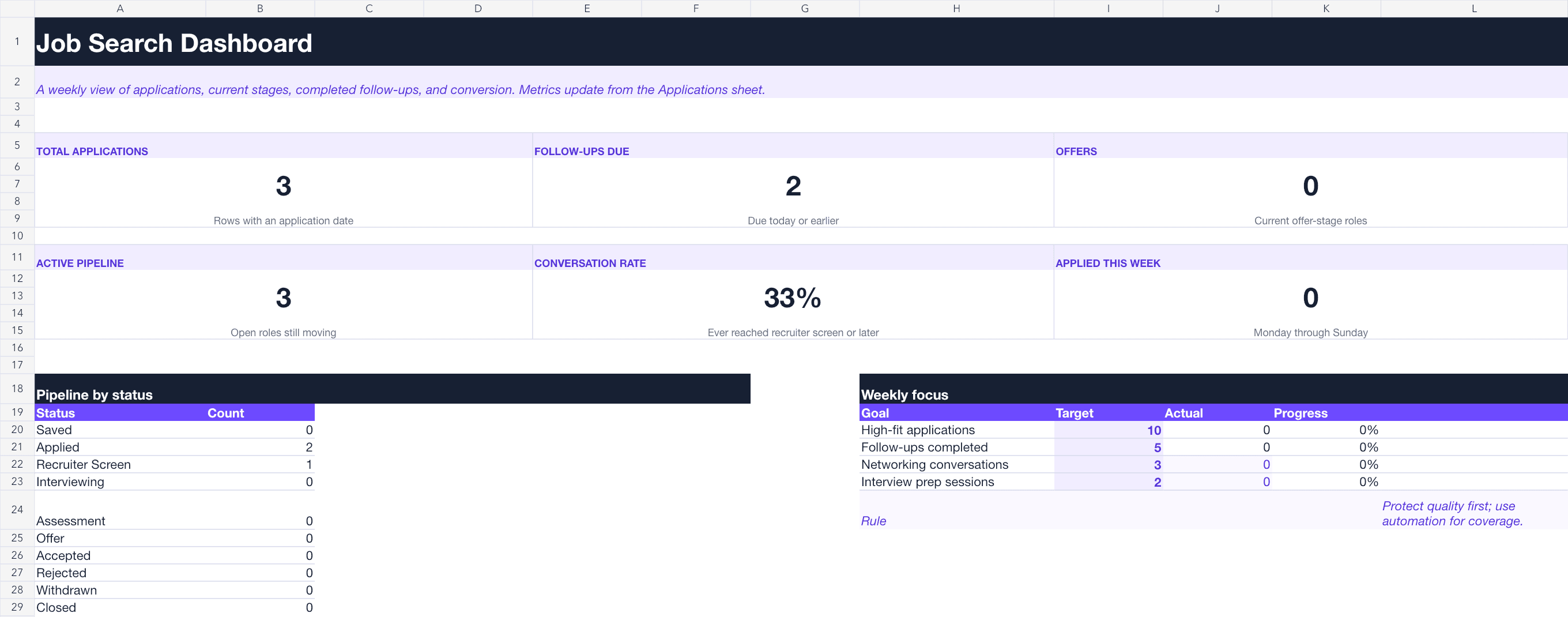
Once you are applying to several roles, it becomes easy to forget which resume you sent, who replied, or when to follow up. This free job application tracker keeps those details in one place and shows what needs attention next.
Use the native Google Sheets version in your browser or download the Excel workbook. Both versions include the same application log, follow-up reminders, pipeline dashboard, and editable dropdowns.
Get the free job application tracker
Both versions are free. There is no email gate, and the formulas are not locked.
What the tracker helps you answer
A useful tracker should tell you:
Did I already apply to this company?
What stage is the application in now?
What is the furthest stage it reached?
Who should I contact, and when?
Which sources and resume versions lead to conversations?
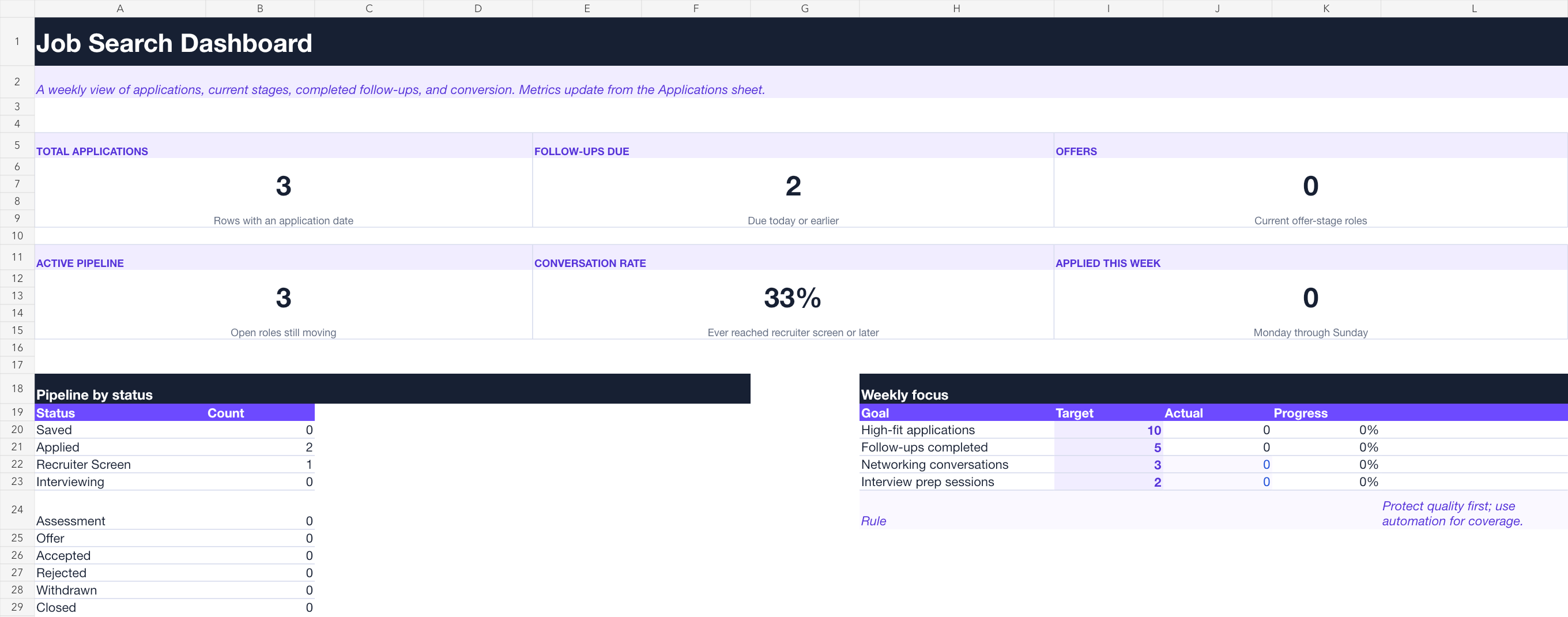
The workbook has four tabs. Applications holds one row per role. Dashboard summarizes the pipeline and weekly activity. Read Me explains the workflow. Lists contains the editable dropdown choices.
The Applications tab includes 500 prepared rows, filters, frozen headers, date and currency formatting, follow-up flags, and visual signals for high-priority, interview, offer, accepted, and rejected roles.
Set it up in five minutes
Open the Google Sheets copy or download the Excel workbook.
Replace the three sample input rows with applications from your current search. Clear or edit columns A–L and O–T. Keep the formulas in M (Days Since Applied) and N (Follow-Up Due?).
Add saved roles before their job descriptions disappear.
Record the application date, resume version, contact, and next action as soon as you apply.
Check the Dashboard once a week and work from the follow-ups that are due.
Save a separate copy of important job descriptions. Employers often remove or revise a posting before the interview process ends.
The fields worth keeping current
Status and highest stage reached
Status shows where the application is now: Saved, Applied, Recruiter Screen, Interviewing, Assessment, Offer, Accepted, Rejected, Withdrawn, or Closed.
Highest Stage Reached preserves the furthest point in the process. If you interview and later receive a rejection, set Status to Rejected but leave Highest Stage Reached as Interviewing. That keeps the Dashboard conversation rate accurate.
Follow-up dates
Next Follow-Up is the next date you plan to act. The Follow-Up Due? column flags an active application when that date arrives, including roles at the applied, recruiter-screen, interview, and assessment stages.
When you send a message, update Last Follow-Up Sent and set the next follow-up date if another is appropriate. The Dashboard counts roles whose latest recorded follow-up falls in the current Monday–Sunday week, not the number of messages sent. Two messages for one role still count as one role. Updating that single date replaces the earlier value; this workbook is not a follow-up event history.
If you need help deciding what to send, use these messages for following up with a hiring manager. Respect any instruction in the job posting that asks candidates not to contact the company.
Resume version, contact, and job URL
Record the exact resume file submitted, such as product-ops-v3.pdf. This lets you compare which positioning produces recruiter conversations. Before submitting, check the file against LifeShack's guide to common ATS resume mistakes.
Add the recruiter, hiring manager, or referrer in Contact. Keep the direct job URL in the tracker, but save the description separately when the role matters.
Salary, next event, and notes
Use Salary Min and Salary Max for the advertised or discussed range. Do not mix annual and hourly figures without noting the unit.
Next Event Date can hold the next recruiter call, interview, assessment deadline, or decision date. Put preparation notes, time zones, and interview details in Notes. For structured practice, compare LifeShack's interview preparation tools.
How the formulas work
Days Since Applied stays blank until you enter an application date, then updates each day:
=IF($G6="","",TODAY()-$G6)
The follow-up flag checks Next Follow-Up against today's date and ignores saved, accepted, rejected, withdrawn, and closed roles.
Conversation Rate uses the same dated application rows for its numerator and denominator. The numerator includes those rows whose Highest Stage Reached is Recruiter Screen, Interviewing, Assessment, or Offer. A final rejection or withdrawal does not erase an earlier interview.
Rows without an application date do not enter either side of the rate. If such a row has a recorded stage, the Dashboard shows how many undated rows were excluded. Add their actual application dates rather than inventing dates or deleting their history.
The rate shows n.a. when there are no dated applications, an application date is invalid or in the future, or a dated row has a missing or unsupported Highest Stage Reached. Read the message beneath the rate to see which input to check. A measured 0% means the dated rows have valid stages and none has reached a conversation stage yet; it is different from missing data.
Two weekly goals update automatically: high-fit applications and roles followed up. Networking conversations and interview-preparation sessions are manual fields because those activities happen outside the application log. Keep one row per role: the workbook counts records and does not automatically deduplicate repeated job URLs. Its prepared formulas and Dashboard ranges cover rows 6–505. Extend both deliberately before adding more than 500 roles.
A practical review routine
Update the tracker after an application, reply, interview, follow-up, or decision. A clean row should take less than a minute to maintain.
Once a week, spend 15 minutes on five questions:
Which follow-ups are due now?
Are high-priority roles getting enough attention?
Which sources are producing recruiter conversations?
Is one resume version performing better than the others?
Are saved roles accumulating faster than you can process them?
Treat small samples carefully. One interview does not prove that a source or resume is superior. Look for a repeated pattern before changing your search.
If applications keep going quiet, use LifeShack's four-step plan for the job application black hole to decide when to follow up and when to move on.
When a spreadsheet stops being enough
A spreadsheet works well when you are choosing roles manually and can keep the rows current. Consider application automation when you have clear job criteria, an accurate profile, and more relevant openings than you can process yourself.
LifeShack AI Auto Apply finds roles against your preferences, prepares supported applications, submits them, and records the activity. Once activated, applications are sent without individual pre-submit review. You can pause Auto Apply and block companies, but filters and matching can make mistakes. Keep choosing and submitting manually if you need to inspect every application before it is sent.
This spreadsheet is separate from LifeShack’s application dashboard; downloading or filling it out does not import your history or activate Auto Apply. You can keep using it for referrals and other manually managed applications. If you want help interpreting a portal label first, see what application under review means.
Frequently asked questions
Is the job application tracker free?
Yes. The Google Sheets copy and Excel download are free, with no email required.
Should I use Google Sheets or Excel?
Use Google Sheets if you want browser access, easy sharing, and a native cloud copy. Use Excel if you prefer a local workbook or already manage your search in Microsoft 365.
How often should I update the tracker?
Update it after each meaningful event, then review the Dashboard once a week. Waiting several weeks makes follow-up dates and pipeline data much less useful.
Why are Status and Highest Stage Reached separate?
Status records where the application is now. Highest Stage Reached preserves how far it progressed. Keeping both lets you close a role without losing accurate conversion data.
Can the tracker remind me to follow up?
It flags dates that are due inside the workbook. It does not send email or calendar notifications, so add an external reminder for time-sensitive interviews or deadlines.